AURISTA
Multi-track audio recording with metadata and timecode
Aurista turns a compatible Mac into a full-featured field recorder and mixer. Use Dante or any good Core Audio interface for I/O, and get up to 32 tracks, metadata, timecode, and built-in mixing in one app.
Mac + Dante or Core Audio interface + Aurista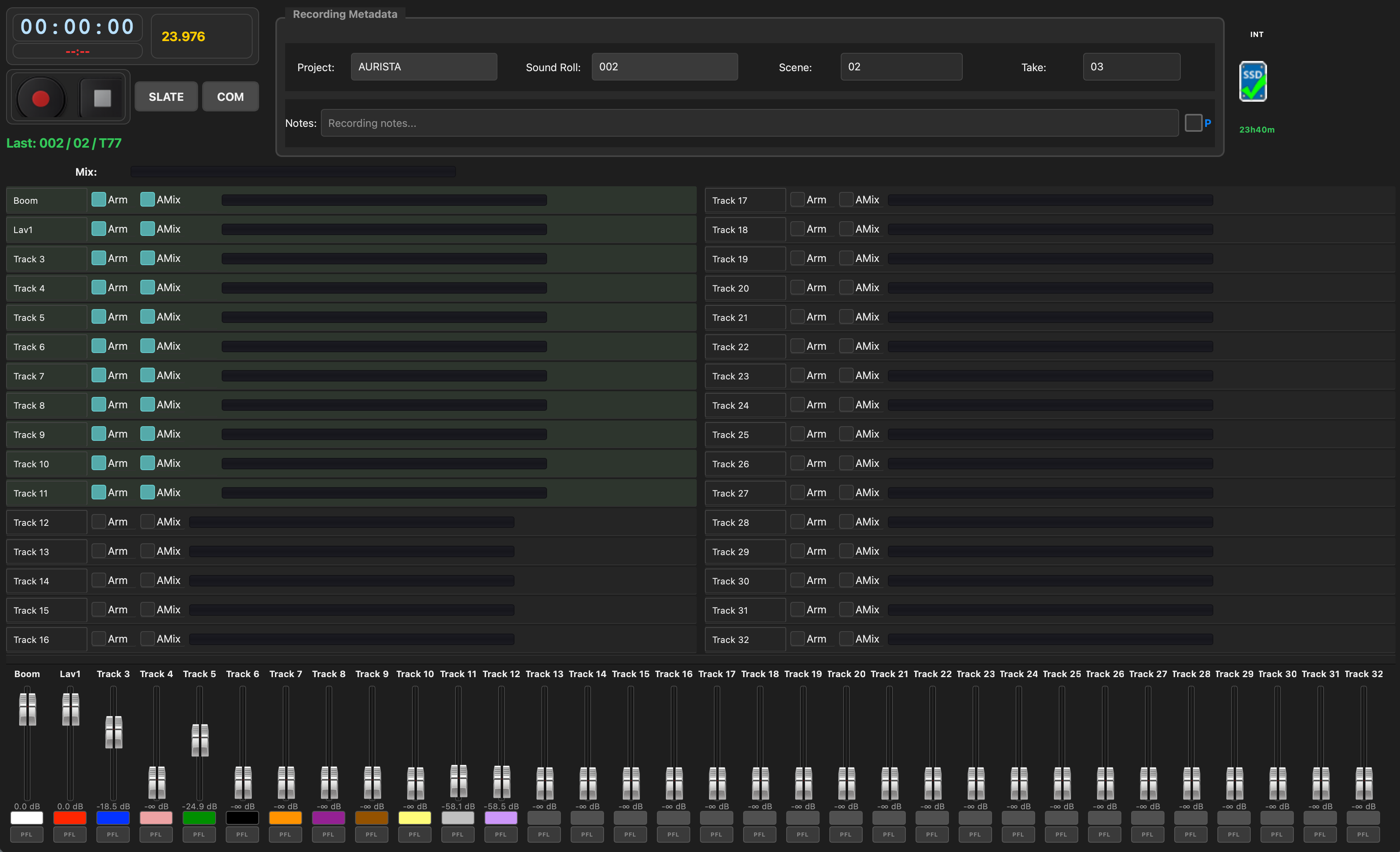
Create an account, verify your email, then download
What it does
Aurista is a macOS application built to replace dedicated hardware location recorders on set. Instead of buying and maintaining a standalone recorder, you run Aurista on a Mac with a Dante network or a capable Core Audio interface — the same capture, monitoring, routing, timecode, metadata, and backup workflow production sound expects, without the dedicated hardware cost.
Record up to 32 tracks at once with broadcast-quality BWF/RF64 files and frame-accurate timecode. Edit and embed production metadata — project, scene, take, sound roll, notes, and more — directly in the app and into your audio files. After license activation, the app runs offline on set.
Capabilities
Metadata editing
- Edit project, scene, take, sound roll, and notes on set
- Metadata embedded into BWF/RF64 files for post-production handoff
- Generate sound reports for production documentation
Recording
- Multi-track capture to internal drive, with optional backup to external media
- Configurable pre-roll and post-roll
- Optional live backup of the active take
Mixing & monitoring
- Per-channel strips with digital gain, EQ, limiters, and aux routing
- Built-in mixer with faders, VU metering, and PFL
- Input/output routing matrix and COM routing
- Automix for dialogue-heavy setups
Timecode
- LTC decode for sync with picture and other gear
- Follow timecode from any audio input
Hardware integration
- Dante or Core Audio — use the I/O you already have instead of a dedicated recorder
- Compatible with professional USB, Thunderbolt, and networked audio interfaces
- Multiple control surfaces (X-Touch, Cantarem, MIDI controllers) — custom-assign each fader
- Drive-status indicators for internal and external media
Post-production & ops
- Playback and review of takes
- WebDAV file server for remote access
- Recovery of interrupted takes
Getting started
- Create an account, verify your email, then download Aurista — includes a 2 Week Free Trial. See the User Manual for setup details.
- Create an account and verify your email address.
- Open Aurista → License Activation and copy your REQ key.
- Sign in and purchase a subscription or redeem a trial code from your account.
- Paste the RESP activation key back into Aurista.
Licensing
- Subscriptions billed through PayPal (3-month or annual plans).
- Download requires a verified email. The app includes a 2 Week Free Trial (one time per Mac).
- One license per Mac — the REQ key is unique to your computer.
- Manage licenses and refresh keys from your account after signing in.
Get your license through your account
Create an account, verify your email, and purchase a subscription from your dashboard. Manage licenses, view purchase history, and refresh activation keys anytime.
Already purchased? Sign in.
Other Software Utilities from Weaver Sound
Free companion apps for production sound — WaveStripper, WaveWeaver, Metaman, and more. Metaman is included in Aurista and also offered free as a standalone Wave Agent replacement. No Aurista subscription required.